AI-Created vs Human-Created Websites: How to Tell the Difference and When Each Makes Sense
By Rahul Vithala · · 10 min read
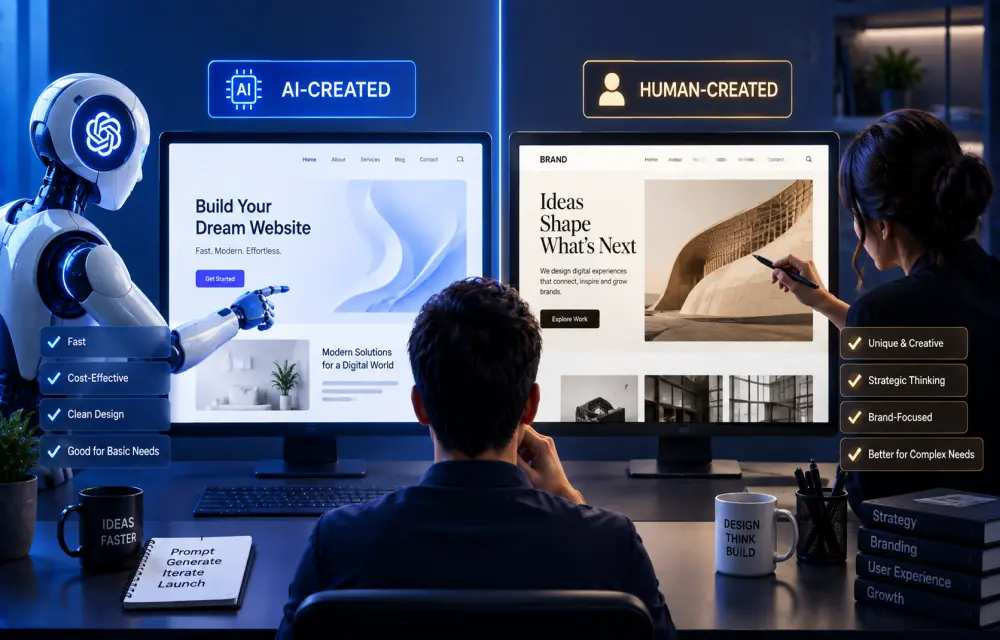
AI can now create a website in minutes. You give it a short prompt, choose a style, and suddenly you have a homepage with a hero section, pricing cards, testimonials, gradients, buttons, and even some ready-made copy.
For many people, this feels like magic.
But when you look closer, you can often tell whether a website was generated mainly by AI or created through a proper human-led design and development process. The difference is not always in how beautiful the homepage looks. In fact, AI websites can look too perfect at first glance.
The real difference appears in the thinking behind the design, the quality of the message, the flexibility of the build, the customer journey, the technical foundation, and how easy the website is to manage after launch.
AI-built websites are not bad. Human-built websites are not automatically better. The right choice depends on what you need. But businesses should understand the difference before assuming that a quick AI-generated website is ready to represent their brand.
Why AI Websites Often Look Similar
One thing many people notice in AI-generated websites is the visual pattern. They often use large headings, soft gradients, rounded cards, oversized spacing, glass effects, dark backgrounds, beige colour palettes, and clean monospace fonts.
There is nothing wrong with these choices individually. Monospace fonts can look modern and technical. They work well for developer tools, AI products, coding platforms, and startup landing pages. But when every new website uses the same typeface, same black background, same glowing gradient, and same rounded rectangular layout, the design starts to feel generated rather than designed.
Recent conversations in web-design communities point out that the giveaway is often not one font or color. It is the combination of familiar visual patterns, inconsistent navigation wording, too many type styles, and a design that looks polished but has little brand-specific personality.
AI is trained on existing patterns. It knows what modern SaaS websites look like. It knows that many landing pages use a large headline, a product screenshot, social proof, feature cards, and a call-to-action button.
So it gives you what has worked before.
The challenge is that your business may not need what every other business has.
A healthcare company needs more trust. A local construction business needs proof and location relevance. A legal firm needs authority and clarity. A SaaS platform needs product explanation and conversion flow. A personal brand needs personality. A media website needs readability and content hierarchy.
AI can generate a good visual starting point. But it cannot fully understand your business without proper inputs.
The “Too Perfect” Design Problem
AI-generated websites can look highly polished in screenshots. Everything is aligned. Every card has the same spacing. Every button is in the correct place. Every section looks clean. The colours match. The fonts are trendy.
But real users do not buy a website because it has perfect spacing.
They buy because they understand what the business does, trust the company, find the right information, and see a clear reason to take action.
Sometimes an AI website looks so polished that it feels generic. It can look like a concept design instead of a real business platform. There may be beautiful cards, but no useful details. There may be animated shapes, but no clear service explanation. There may be a strong headline, but no proof, process, pricing clarity, customer story, location, or founder credibility.
This is where human design thinking matters.
A good human designer does not begin with “What will look cool?” They begin with questions like:
-
Who is visiting this site?
-
What problem do they have?
-
What do they need to understand first?
-
Why should they trust this business?
-
What should they do next?
-
What information may stop them from inquiring?
-
What pages will matter after the homepage?
A website should not only impress people. It should guide them.
AI Can Build HTML, but WordPress Needs Structure
Another common situation is this: a client uses AI to generate a complete HTML website, then asks a developer to place it inside WordPress.
This looks simple in the beginning. The AI output may contain a single HTML file with CSS and JavaScript. It can be copied into a WordPress page builder, a custom HTML block, or a theme template.
But this is not always the right way to build a WordPress website.
WordPress is not just an HTML page. It is a content management system. A properly built WordPress website should allow people to edit pages, update content, change images, publish blogs, manage menus, add forms, improve SEO, handle plugins, and maintain the site without breaking the layout.
If a full AI-generated site is inserted as one large HTML block, it becomes difficult for a client to edit. A developer may understand the code, but the business owner may not. Small changes can require someone to touch raw HTML and CSS. A simple content update can become a technical task.
This concern appears frequently in WordPress discussions. Developers say AI can create useful templates, components, snippets, and early prototypes, but generating a maintainable WordPress architecture across templates, blocks, CSS, functions, and plugins is far more difficult.
One LinkedIn discussion also described a growing trend of clients bringing AI-generated HTML files to agencies. The useful approach is not to reject them. It is to clean the code, optimize it, rebuild it in a proper WordPress structure, and make sure the final website performs well.
That is the key difference.
AI output can be a starting point. A human developer turns it into a maintainable product.
The Benefits of AI-Created Websites
AI website tools have real advantages, especially for early-stage founders and small businesses.
The biggest advantage is speed. Instead of waiting weeks for a basic landing page, a person can generate a draft in minutes. It can help founders test an idea, present a concept, create a temporary event page, or launch an MVP landing page before investing in a full build.
AI is also useful for people who are not designers or developers. It can suggest layouts, create basic copy, recommend colours, generate sections, and give someone a starting point when they do not know where to begin.
For a simple portfolio, local service page, personal landing page, event website, or early product waitlist, AI can be enough to get online quickly.
Several forum discussions describe AI builders as useful for beginners and simple business sites because they reduce the need for coding and speed up basic setup. But those same discussions also point to trade-offs: less flexibility, limited custom features, potential portability problems, and the need for manual work on real content such as pricing, photos, service areas, and FAQs.
AI is very good at momentum. It helps people move from a blank page to a working draft.
The Risks of Using AI Without Human Review
The problem starts when people assume the first AI output is ready to launch.
A website can look finished but still have weak SEO structure, poor content hierarchy, missing accessibility details, slow performance, broken mobile sections, unclear forms, insecure code, or no real conversion strategy.
AI-generated code may also create hidden problems. It can include unnecessary scripts, duplicate CSS, messy classes, unoptimized images, weak semantic structure, or JavaScript that becomes difficult to debug later. In some cases, a codebase looks clean initially but becomes hard to update when the business adds new features.
Reddit discussions around AI-generated code often make this point clearly: AI-created code can be suitable for static websites, but there are concerns around trust, maintenance, obscure bugs, security, and the difficulty of making future changes.
That does not mean custom code is always easy and WordPress is always difficult. Both approaches need expertise. The point is that a website should be built for its long-term purpose, not only for the first screenshot.
Human Websites Have Their Own Problems Too
Human-created websites are not perfect by default.
A poorly managed agency can deliver an outdated site. A designer may focus too much on aesthetics and ignore conversions. A developer may build something technically strong but difficult for the client to update. A WordPress site can become slow because of too many plugins. A custom-built site can become expensive if every small change requires a developer.
Human work can also take longer. Discovery, research, design, content planning, feedback, revisions, development, testing, and launch all require time. For a small business that only needs a quick online presence, a full custom process may feel unnecessary.
This is why the debate should not be “AI versus humans.”
The better question is: What level of thinking does this website need?
A simple announcement page does not need a large agency process. A business website that represents your company, generates leads, supports content, handles customer data, and needs to grow over time requires more than a quick AI draft.
The Best Approach Is AI-Assisted, Human-Led
The best websites in the coming years will not be built by humans who ignore AI or by AI tools left without human direction.
They will be built through a hybrid process.
AI can generate two or three initial design directions. It can help create wireframes, draft content, suggest page structures, summarize customer research, generate starter code, and speed up repetitive development work.
Then a human team can decide what is right for the brand.
A designer can refine the visual identity. A strategist can improve the customer journey. A copywriter can add the founder’s real story and customer language. A developer can build proper components, optimize performance, ensure security, and make the website easy to maintain.
One LinkedIn workflow captures this well: use AI to create early concepts, choose the strongest direction with the client, refine it through proper design work, and then build it correctly in WordPress. The result is faster early exploration without sacrificing quality and maintainability.
This is also how TheTechHacker Labs approaches digital products and websites. AI can accelerate the process, but experience turns an idea into a working solution.
How to Identify an AI-First Website
You should not judge a website only by its font or colour. But there are a few common signs that a website may have been generated quickly with AI:
-
It uses a familiar combination of glowing gradients, excessive rounded cards, and generic SaaS-style sections.
-
It relies heavily on monospace or mixed fonts without a clear brand reason.
-
The copy sounds polished but says very little about the actual business.
-
Every section looks visually balanced, but there is no clear customer journey.
-
Navigation labels are inconsistent or confusing.
-
It uses stock-looking visuals instead of real work, people, products, or case studies.
-
The WordPress page is one large HTML block that nobody can edit properly.
-
The mobile experience has not been carefully tested.
-
The website has no clear SEO structure, service pages, FAQ content, or conversion tracking.
Again, these are not proof. A human designer may also use monospace fonts and rounded cards. The difference is intent. In a human-led website, design choices support the brand. In a generic AI website, design choices often exist because they are common patterns.
Final Thoughts
AI is making websites faster to create, easier to prototype, and more accessible for small businesses. That is a positive change. It allows more people to test ideas and launch online without waiting for large budgets.
But generating a website is not the same as creating a digital business asset.
A real website needs more than a clean hero section and a perfect gradient. It needs a clear message, the right structure, useful content, strong performance, a conversion path, maintainable technology, and a real understanding of the people it serves.
Use AI to create momentum. Use human expertise to create meaning.
The most successful websites will not look “AI-generated” or “human-generated.” They will look like they understand the business, the audience, and the real problem they are meant to solve.